
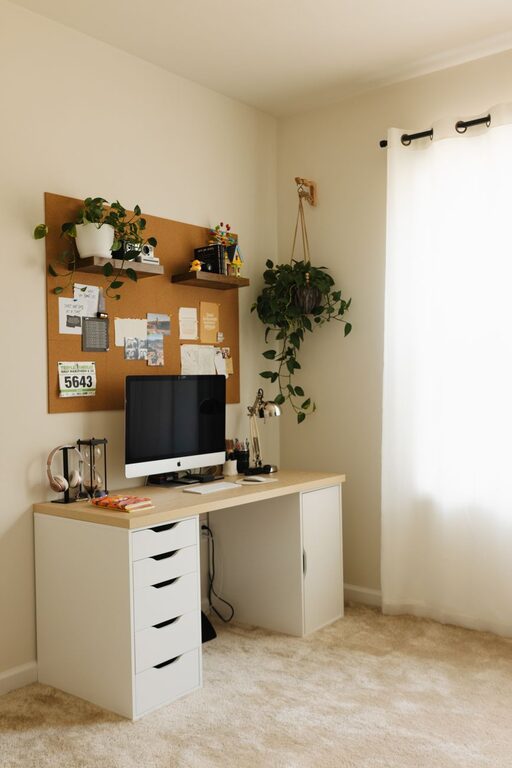
Creating a home office that feels both cozy and productive is a great way to enjoy working from home while staying focused and motivated. Whether you are a remote worker, a freelancer, or simply need a dedicated spot for personal projects, the right setup can make all the difference. Here are some helpful tips to design a home office space that combines comfort with efficiency.
Choose the Right Location
Find a Quiet Corner
The first step in setting up your home office is finding a spot with minimal distractions. Choose a quiet area away from the main living spaces to help you concentrate better. If possible, select a room with a door that you can close for privacy.
Consider Natural Light
Natural light is beneficial for both mood and productivity. Position your desk near a window to enjoy sunlight during the day. If natural light is limited, invest in good-quality lighting to keep the space bright and inviting.
Pick Comfortable and Functional Furniture
Invest in an Ergonomic Chair
Since you’ll likely be sitting for long hours, a comfortable and adjustable chair is essential. Ergonomic chairs support good posture and reduce the risk of back and neck pain.
Choose a Desk That Fits Your Needs
Select a desk with enough surface area for your computer, paperwork, and any other tools you need. Consider a standing desk or a convertible option if you want the ability to alternate between sitting and standing throughout the day.
Organize Your Workspace
Keep Essentials Within Reach
Arrange your most-used items like pens, notebooks, and charging cables so they’re easy to access. This reduces interruptions and helps maintain workflow.
Use Smart Storage Solutions
Declutter your desk by using shelves, filing cabinets, or boxes to store documents and supplies. Label storage containers clearly to find things quickly when needed.
Personalize with Comfort and Style
Add Soft Textiles
Incorporate cozy elements like a soft rug, cushions, or a throw blanket. These textures create warmth and invite relaxation during breaks.
Decorate Thoughtfully
Use artwork, plants, or decorative items that inspire you without causing distractions. Green plants are especially great for improving air quality and adding life to the room.
Improve Air Quality and Comfort
Ventilation is Key
Keep your office well-ventilated by opening windows regularly or using an air purifier. Fresh air can improve concentration and reduce fatigue.
Control Temperature
Make sure the space stays at a comfortable temperature all year round. Use fans, heaters, or humidifiers as needed to maintain a pleasant work environment.
Minimize Distractions
Manage Noise Levels
If external noise is a concern, consider using noise-canceling headphones or white noise machines. These tools can help block out background sounds that might interrupt your focus.
Establish Boundaries
Set clear rules with family or housemates about your work hours and when interruptions are not allowed. This helps maintain a professional atmosphere even at home.
Utilize Technology Wisely
Equip Your Office with Essential Gadgets
Ensure you have reliable internet, sufficient power outlets, and up-to-date devices. Having the right technology supports smooth and efficient work sessions.
Use Cable Management Tools
Tidy up cables with clips or sleeves to prevent a tangled mess. A neat workspace feels more organized and helps reduce stress.
Schedule Breaks and Movement
Incorporate Movement into Your Day
Plan short breaks to stretch and move around. This reduces stiffness and helps maintain energy levels.
Create a Relaxation Spot
If space permits, include a small comfortable chair or area where you can step away from your desk for a few minutes to recharge.
Closing Thoughts
Designing a home office that is both cozy and productive takes some planning, but the effort pays off by making work more enjoyable and effective. Focus on comfort, organization, good lighting, and personal touches to create a space where you look forward to spending your workday. With these tips, you can make your home office a perfect blend of comfort and efficiency.